How's mydownload?
Your browser downloads, live on your Android phone: progress, speed, time left. Pause, resume or restart from your pocket. Filenames are encrypted on your PC.
How's My DownloadChrome · toasternow
pop-os_24.04_amd64_generic_28.iso
52.2% · 4.7 MB/s · 4m 26s left
Grab it. Pair it.
Pocket it.
Three steps, about two minutes. Both files come from GitHub Releases: the app isn't on the Play Store and the extension isn't on the Chrome Web Store yet.
Install the app
Open the APK on your phone, allow the install, then allow notifications.
apk · 33.8 MBhows-my-download-v0.3.1.apk
Add the extension
Unzip it, open
chrome://extensions, switch on Developer mode, Load unpacked.zip · 102 KBhows-my-download-extension-v0.3.1.zip
Scan once
Click pair device in the extension, tap
> scan qr codein the app. Both sayPAIRED. Start a download.> full setup guidedefault server: hmd-api.duckdns.org
--releasev0.3.1 · checksums in SHA256SUMS.txt · all release files · run your own server
Desk. Relay. Pocket.
Four hops from your browser to your lock screen, and one back. The filename gets sealed on the PC and opened on the phone. Nothing in the middle can read it.
01desk
The extension watches
Every 2 s while something downloads, the extension reads bytes, total and state from the browser. Nothing downloading? It goes quiet. A paused download is reported once.
filename
pop-os_24.04_amd64_generic_28.iso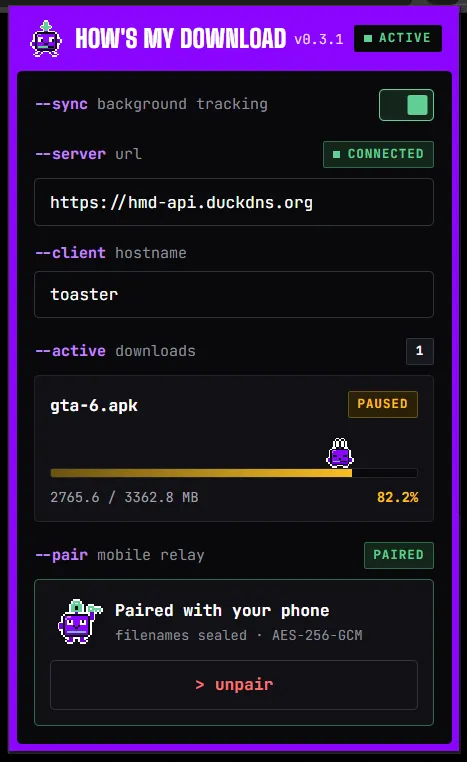
The extension popup, tracking and paired. 02desk
The name gets sealed
Before anything leaves your PC, the filename and file type are encrypted with AES-256-GCM, using a key made when you paired. Can't encrypt? The update is dropped. Plain text never ships.
filename
enc:v1:q3Rk8w1cZ0pH7mVb:Jx0aT2yN…f9Qe8w==# what leaves your PC, per field enc:v1:<base64 iv>:<base64 ciphertext + tag> # AES-256-GCM, a fresh 96-bit IV each time # no key, or the crypto throws? drop the update. never plain text.
03relay
The relay does math, not names
A small FastAPI server smooths the speed, works out the time left and sends at most one push every 2 s per phone. Paused, complete and failed skip the queue. The name passes through still sealed.
filename
enc:v1:q3Rk8w1cZ0pH7mVb:Jx0aT2yN…f9Qe8w==# FCM data message, high priority seq "42" pc_name "toaster" browser "Chrome" downloads [{"filename":"enc:v1:…", "percentage":52.2,…}] # at most one push per 2 s per phone
04pocket
Your phone opens it
A high-priority FCM data message wakes the app for a moment, with no always-on connection. It decrypts the name with the key from the QR and updates the notification. Median delivery: 448 ms.
filename
pop-os_24.04_amd64_generic_28.iso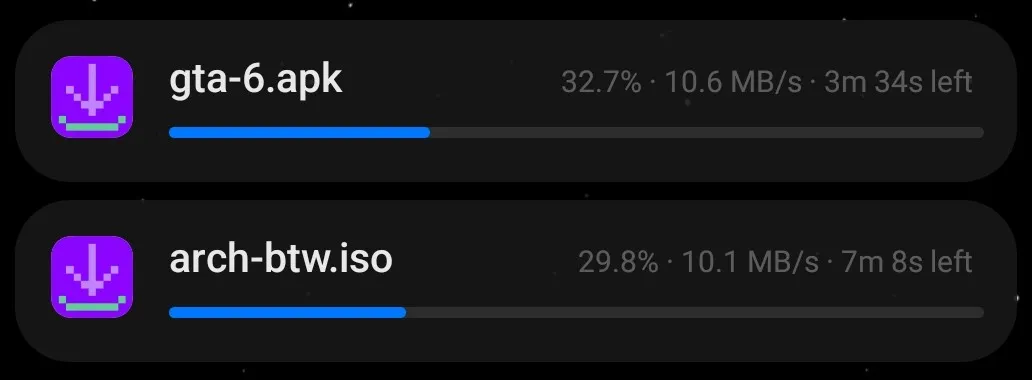
The real notifications, right on the lock screen. One per download. 05back to desk
And back: tap pause
Tap Pause on the phone. The server hands the command to the extension on its next update, the browser pauses, and your phone shows
PAUSED. Measured round trip: about 1.8 s.filename
pop-os_24.04_amd64_generic_28.iso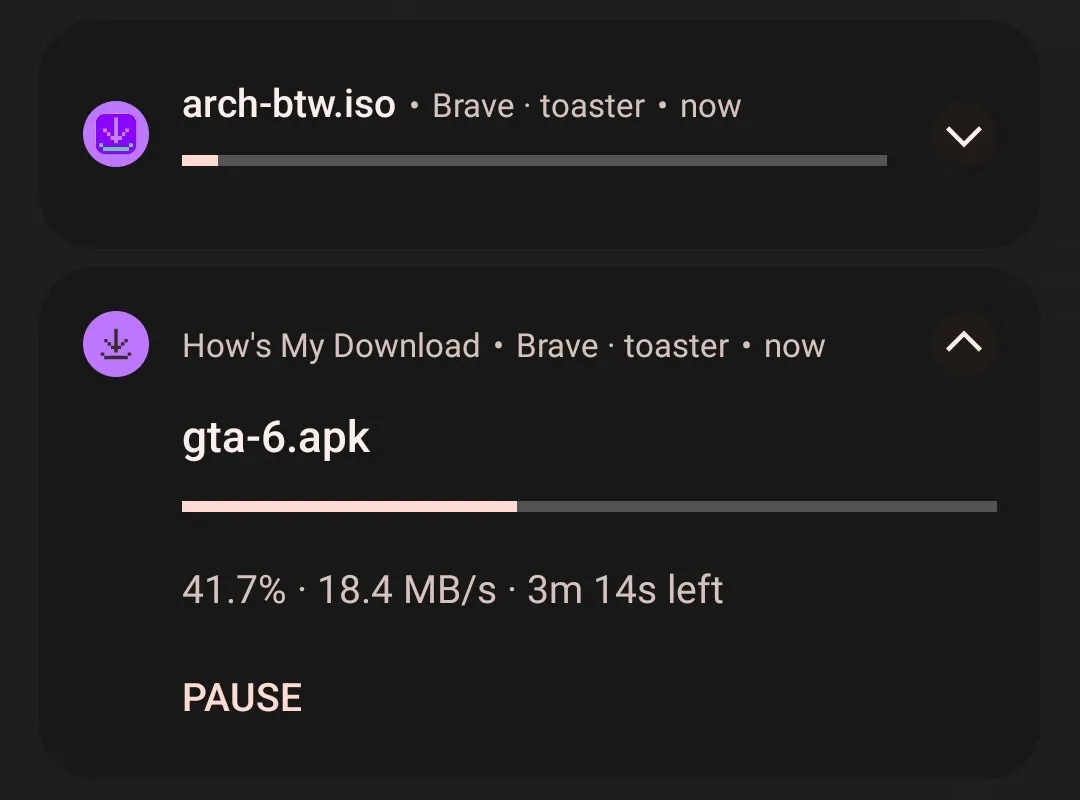
Expand it and tap Pause. Resume and Restart come back the same way.
Six states. Zero chill.
Meet Sammy, a download update with legs. Each pose is a real state, and the card under it is what your phone shows, buttons included.
starting
The browser just started it. The first update leaves on the next 2 s tick.
pop-os_24.04_amd64_generic_28.iso
0.0% · 0 B/s
downloading
Progress, speed and time left, about every 2 s. Three or more at once? A summary adds up the count, speed and data left.
pop-os_24.04_amd64_generic_28.iso
52.2% · 4.7 MB/s · 5m 41s left
Pause
paused
Paused from the phone or the PC. Resume picks up where it stopped; Restart goes back to 0%.
omarchy-4.0.6 (1).iso
36.3% · PAUSED
ResumeRestart
completed
Skips the 2 s queue and lands as its own notification. Go back to the desk. Or don't.
Download Complete
omarchy-4.0.6.iso
failed
Also skips the queue. Restart it from the phone, or Resume when the browser can pick it back up (say, after a network drop).
Download Failed
arch-btw.iso
Restart
PC offline
No update for 90 s mid-download: lid closed, Wi-Fi gone. It's an alarm, so it fires even if Android killed the app.
PC Offline
Transfer stalled…
The server sees bytes. Not names.
Pairing is one QR code. The extension makes a fresh 256-bit key and puts it in that QR, and only there. It goes from your screen to your phone's camera, never through the server.
--server-sees
- byte counts and states
- timing
- your PC name
- IP addresses
- your phone's push token
--never-sees
- filenames
- file types
- the encryption key
POST /v1/samples
{
  "pc_name": "toaster",
  "downloads": [{
    "filename": "enc:v1:q3Rk8w1cZ0pH7mVb:Jx0aT2yN…f9Qe8w==",
    "mime_type": "enc:v1:Lw3kQe81ZpVx0aTn:Yv2Bq…",
    "bytes_downloaded": 1430280000,
    "total_bytes": 2740000000,
    "state": "downloading"
  }]
}- Hide filenames. One toggle in the app and notifications show only the status line. Names stay inside the app.
- No accounts. No email, no password, no analytics. A pairing is two random secrets, stored on the server only as hashes.
- Fails closed. No key or a crypto error, and the update is dropped. It never goes out in plain text.
- protocol spec
Measured, not vibes.
Measured on 24 Oct 2026 against the production server (Oracle Cloud, India region), with a POCO M4 Pro (Android 13) on 4G and Chrome on a Windows 11 laptop. Battery use, Wi-Fi delivery and other phones aren't measured yet, so they aren't here. Methods in docs/metrics.md.
448ms
server to phone, push delivery, median
p95 680 ms · p99 782 ms · 386 pushes1.8s
tap Pause, browser pauses, phone shows PAUSED
median · range 1.4 to 2.2 s219ms
tap to "Pausing…" on the phone
median · range 181 to 255 ms1.5ms
server time per update
median · p95 1.9 ms · in-process39ms
PC to server round trip
median · p95 41 ms4.11.8sThe pause round trip first measured 4.1 s. Measuring found the bug: the extension waited for its next 2 s tick before reporting the change. The fix halved it, and a regression test now guards it.
--built-with
- extension
- JavaScript, Manifest V3, zero dependencies, Web Crypto
- server
- Python 3.12, FastAPI, Pydantic v2, Firestore
- app
- Kotlin, Jetpack Compose, CameraX + ML Kit, Android Keystore
- push
- Firebase Cloud Messaging
- deploy
- Docker (amd64 + arm64), Nginx
- ci
- every push: server 128 tests (83% coverage), extension 43, Android 33
Beforeyou ask.
Is it free?
Yes. MIT licensed, no account, no ads. The whole thing is on GitHub.
Can the server see my files?
No. It never sees file contents or filenames. It sees byte counts, timing and your PC name. Self-host to keep even that on your own machine.
Does it drain my battery?
The phone keeps no open connection: Android wakes the app briefly for each update. Battery usage is minimal, but no numbers on that yet.
Which browsers?
Chromium-based ones. Tested on Chrome and Brave. Edge, Opera and Vivaldi use the same extension system and should work, but are untested. Not Firefox or Safari.
iPhone?
When Apple stops being a jerk.